Feature 3Fun & Flexible Shooting Modes
Fun and easy ways to enjoy capturing photos and movies from land to underwater. Also offering various shooting modes suitable for any scene.
6 Scene SR AUTO
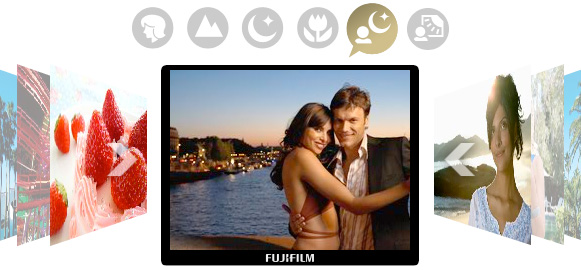
Framed scenes are automatically detected and selected into appropriate camera settings: Portrait, Landscape, Night, Macro, Night Portrait, and Backlit Portrait.
 Portrait
- Recognizes portraits by detecting the faces quickly in the frame and optimizing focus, brightness and white balance.
 Landscape
- Scenic shots such as mountains and buildings are automatically recognized. Colors of the sky, forests, and flower fields are captured in vivid colors and depth.
 Night
- For low-light and nighttime scenarios, shutter speed and sensitivity are automatically adjusted, producing blur-free pictures with minimal noise.
 Macro
- Macro mode sets the focusing position of the details of small flowers or tiny subjects accurately.
 Night Portrait
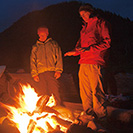
- When photographing people at night or in low light, SR AUTO optimizes flash range, shutter speed, and exposure of the portraits, while capturing smooth and luminous background.
 Backlit Portrait
- Optimizes brightness of the faces that usually end up in shadow and underexposure caused by the light behind.
Face Detection
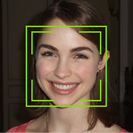
Face Detection optimizes people pictures by identifying faces and adjusting focus and exposure to ensure bright, clear results.
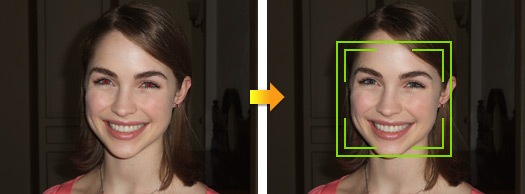
- Conventional Digital Camera
- FinePix XP20
Red-eye Removal in Detected Faces
Red-eye removal automatically detects and corrects flash reflection for a perfect end result.
Instantly Detect up to 6 Faces!
The Face Detection can simultaneously recognizes up to 6 faces in a photo. Share your group portraits using the zoom up function in playbacks, checking each detected face. Each priceless expression can be cropped and saved in clear high resolution results.
Face Detection Timer Function
The Face Detection Self-timer automatically sets off after the number and position of faces in a scene are detected, snapping the photo at the right moment, with all the faces in focus and properly exposed.
Couple Timer
Just the two of you? Couple Timer waits until two faces are close together in the frame. Select “Near,” “Close Up” or “Super Close” depending on the level of intimacy you're aiming for!
Group Timer
Out and about with your friends? Group Timer mode gives you time to get into position as it waits until the number of faces are detected in the frame. You can select up to 4 faces and enjoy the moment ready to be captured!
Motion Panorama
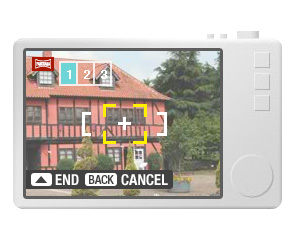
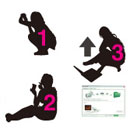
Lets you take panorama photos as simply as 1, 2, 3! The camera automatically stitches together three consecutive shots, with simple in-frame guidance to ensure the images are aligned. The resulting image is saved to the memory card as an impressive panorama.
Microsite
Introducing handy tips on how to capture great panoramic images with Motion Panorama.
One Touch Underwater Movie Recording
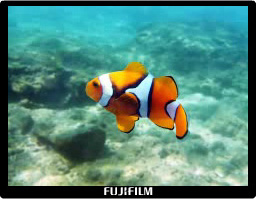
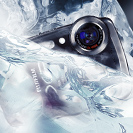
With just a touch of a button, shoot movies underwater. No settings. Just press, shoot and enjoy the movie.
Tracking Auto Focus
Keeps fast moving subjects in the frame and in focus, even at 5x zoom extended. Great for capturing dynamic close-ups.
Versatile Shooting Modes
In addition to a wide range of shooting modes, the FinePix XP20 offers a selection of versatile scene positions that ensure optimum results no matter what the scene.
 SR AUTO
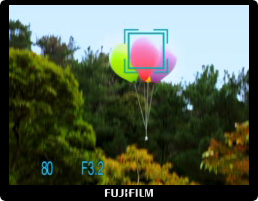
- Frame your shot and SR AUTO intelligently recognizes the scene and selects the ideal settings.
 AUTO
- The easiest mode for taking pictures. Use this for ordinary photography.
 Program Auto
- Automatic mode to specify the settings except for the shutter speed and aperture setting.
 Natural Light & with Flash
- Shoots 2 images continuously, without flash and with flash. Comes in great handy during marginal shooting situations.
 Natural Light
- Produces beautiful images that retain the natural ambience when shots are taken in low-light conditions.
 Portrait
- Set for shooting portraits. Skin tones are softened as it enhances the overall natural look.
 Portrait Enhancer
- Enables automatic enhancements of skin tone.
 Landscape
- Best for shooting scenery in daylight capturing clear and sharp shots of buildings and mountains effectively.
 Motion Panorama
- Sweep the camera right or left to create panoramic image.
 Sport
- A quick recognition of persons in motion or objects for a faster shutter speed to help you catch the perfect moment.
 Night
- Mode for shooting evening and night scenes. A picture is taken with a slow shutter.
 Snow
- Most adaptable to snow scenes without unnatural darkened images or where the whole screen appears white.
 Sunset
- Capture sunset scenes vivid in color.
 Night (Tripod)
- Clear shots of twilight scenes using tripod.
 Beach
- Clear shots of people without darkened images under strong sunlight.
 Underwater
- Best for shooting underwater capturing clear images of the ocean blue.
 Underwater (Wide)
- Clear underwater picture in wide view capturing the dynamism of the wondrous water world.
 Underwater (Macro)
- Capture the underwater subjects up close with clarity and in eloquent colors.
 Party
- Best for shooting indoor weddings or parties. Retains the natural ambience in low-light conditions.
 Flower
- Capture a clear close-up shots of blooming flowers rich in color.
 Text
- Clear shots of letters on a document or white board.
Notes
- * Sample photos are simulated images.
- * Depending on the scene conditions, Face Detection performance may vary.